The resolution you need.
Choose resolutions and bit depths reported by your connected displays.


Unlock access to all display resolutions of attached devices and bit depths.
macOS 13 (Ventura) or later Prices in USD.
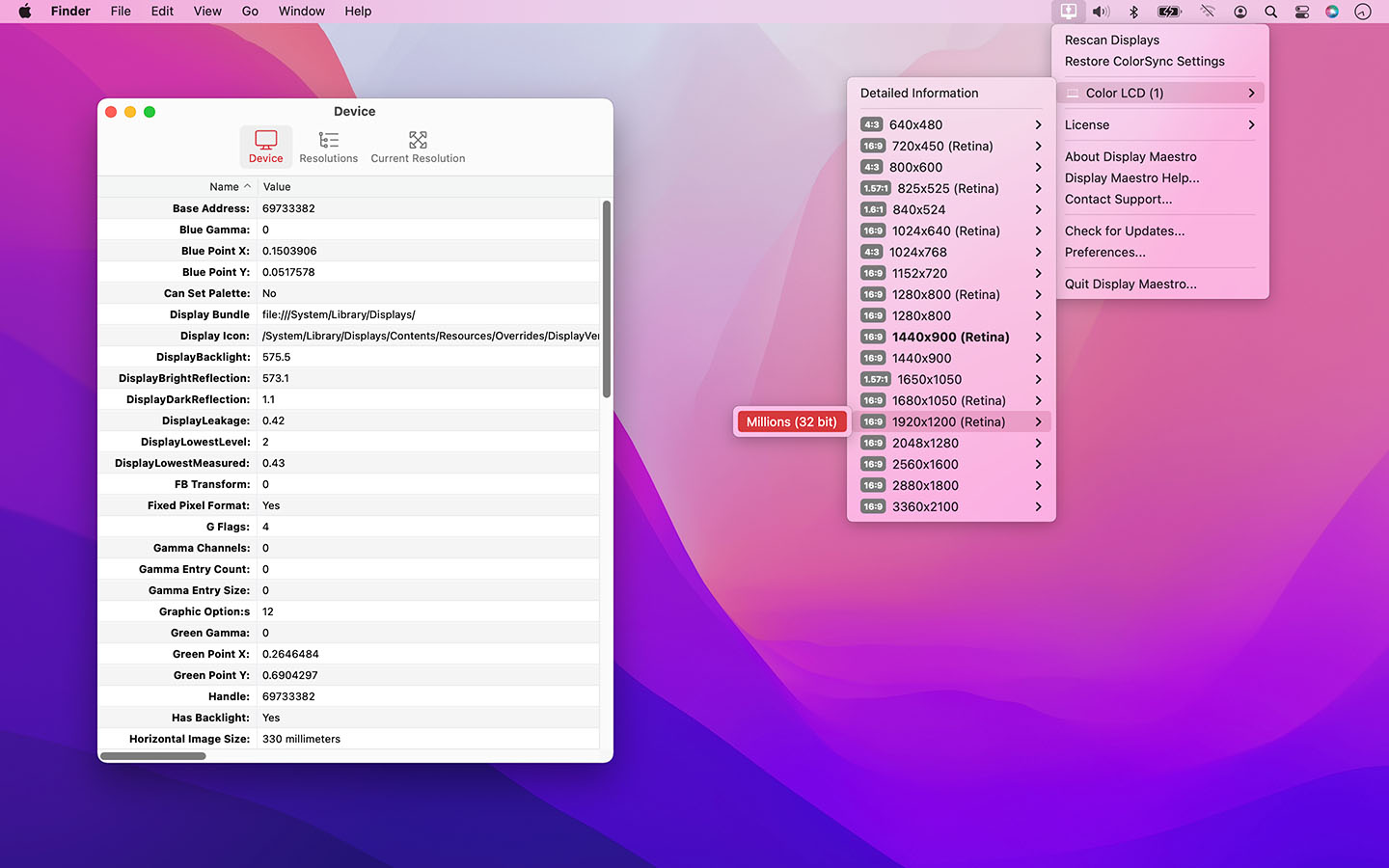
Choose resolutions and bit depths reported by your connected displays.
Reach your display configurations from a traditional Mac-like menu.
Inspect display hardware, refresh rates, gamma and HiDPI details.
Display Maestro gives you full control over attached displays, allowing the use of all available resolutions and bit depths. Latest versions of macOS strip out the useful ability to set specific resolutions and presents a more user-friendly approach.
Experienced users, especially graphic designers and presenters, demand more precise control of their devices. Access exactly the resolution you need with Display Maestro's traditional Mac-like menu.
Access the full list of resolutions and bit-depths supported by the graphics card and attached display. Note that some graphics cards may limit the display's options.
Older games and apps sometimes require the use of precise resolutions, and can no longer set these automatically due to changes in macOS. Display Maestro lets you pick exactly the configuration you need.
Display Maestro implements functionality that will detect if an unsafe resolution was chosen and will automatically revert to the last known safe resolution if confirmation is not given.
Pro users can also view advanced resolution and device information ranging from gamma configuration, RGB color points, scaling, samples per pixel, screen dimensions, device vendor IDs, refresh rate, manufacture dates, dots per inch, Retina (HiDPI) status, and more.
Also view feature information such as if the following are enabled are supported: pan enabled, simulscan enabled, is stretched, television mode, Desktop GUI support, interlace mode, mirroring supported, built-in, high-resolution capable, accelerator backed, and more.
Display list of all displays and resolutions.
View display capabilities like backlist, mirroring, digital, stereo, OpenGL acceleration, HiDPI capable, and AirPlay.
Restore ColorSync settings.
View the white, red, green, and blue gamma values as well as channels
Toggle list of unsafe resolutions.
View vendor codes and manufacture dates.
View display properties simulscan, television mode, samples per pixel, pan required, display size, interlaced, bytes per row, bits per sample, and more.
View the red, green and blue X,Y points.
View display transformation values.
1 computer/user · 5 unique devices per year
1 household · 10 unique devices per year
1 computer · 2 unique devices per year
1 school · 300 unique devices per year
10 computers/users · 60 unique devices per year
Unlimited computers/users · 10000 unique devices per year
Prices in USD.
For older licences and operating systems. These releases are no longer supported.
9 downloads
| Released | Compatibility | Download |
|---|---|---|
| August 31, 2026 | 31.45 MB |
| Released | Compatibility | Download |
|---|---|---|
| November 2, 2021 |
From macOS 10.14 or later Last version compatible with macOS 10.14 |
22.79 MB |
| Released | Compatibility | Download |
|---|---|---|
| December 15, 2020 | From macOS 10.14 or later | 22.76 MB |
| Released | Compatibility | Download |
|---|---|---|
| February 23, 2020 | From macOS 10.13 | 15.73 MB |
| Released | Compatibility | Download |
|---|---|---|
| November 27, 2018 | From Mac OS X 10.10 | 15.45 MB |
| Released | Compatibility | Download |
|---|---|---|
| April 17, 2018 | From Mac OS X 10.10 | 16.20 MB |
| Released | Compatibility | Download |
|---|---|---|
| January 5, 2016 |
From Mac OS X 10.7 (Intel) Last release for Mac OS X 10.7/10.8 |
11.52 MB |
| Released | Compatibility | Download |
|---|---|---|
| October 14, 2014 | From Mac OS X 10.7 (Intel) | 8.97 MB |
| Released | Compatibility | Download |
|---|---|---|
| February 10, 2012 | From Mac OS X 10.6 (Universal) | 8.92 MB |
| Version 6.0 – October 11, 2026 | |
|
Requirements This version requires macOS 13 (Ventura) or later. Older versions remain available on our web site for earlier versions of macOS. |
|
| Upgrade Notes This major-version upgrade is included for users with an active subscription, Utility Package Pro, or a lifetime license. Owners of version-only licenses for earlier major versions can purchase the current version on our web site. |
|
| New Feature: | Favorite Resolutions keep commonly used modes close at hand for each display, with Apply, Details, and Add/Remove Favorite actions for each mode. |
| New Feature: | Give any resolution a custom name, independently of favorites. Names appear alongside dimensions in resolution menus and details. |
| New Feature: | Copy or export information for one display, one resolution, or all connected displays for troubleshooting and support. |
| Enhancement: | Expanded Display Tools with quick access to Display Settings, ColorSync Utility, and System Information, alongside display rescanning and ColorSync restoration. |
| Enhancement: | Refreshed menu-bar menus with Retina-ready macOS symbols, rounded Retina and aspect-ratio badges, clearer current-mode indicators, and grouped License, Display Tools, and Help and Support commands. |
| Enhancement: | Modernized Settings with a visible login-item registration indicator, live approval status, and a link to System Settings when approval is needed. |
| Enhancement: | Redesigned Detailed Information with native symbols, visual capability indicators, and clearer resolution browsing with aspect-ratio and Retina columns. Current Resolution Info opens the shared inspector from the Device tab. Technical details support multiple selection, concise field explanations, and checkmark/cross Boolean indicators. |
| Enhancement: | Resolution inspectors provide editable names and favorite controls on the left of the toolbar, with Copy and Export actions grouped on the right. |
| Enhancement: | Added sandbox entitlements and an explicit, responsive Finder Automation permission flow for remembering desktop icon positions. |
| Enhancement: | Removed unused raster toolbar images and obsolete display and login-item paths, and reorganized the project into focused engine, menu, layout, settings, and window folders. |
| Bug Fix: | Preserved name edits when details windows close or displays disconnect, including case-only renames. Resetting or importing settings no longer restores stale names from open windows. |
| Bug Fix: | Preserved older favorite names through preference migration and repeated loading. Imported settings correctly apply the Open at Login choice without overriding changes made in macOS during an ordinary launch. |
| Bug Fix: | Resolution Details shows the exact native mode requested, and display matching rejects a different monitor that reuses an anonymous display ID. |
| Bug Fix: | Custom names and favorites distinguish color-depth variants while retaining previously saved choices. |
| Bug Fix: | Available Modes lists equivalent choices once and retains the active native variant. Retina scaling and high-resolution capability are reported separately. |
| Bug Fix: | Improved menu recovery after native initialization or rebuild failures, and preserved menu callbacks while replacing menu contents. |
| Bug Fix: | Prevented overlapping decisions during unsafe-mode confirmation and kept the original restoration deadline after a failed confirmation. |
| Bug Fix: | Custom resolution names remain saved when favorites are removed. Corrected field descriptions for legacy display flags and non-preset modes. |
| Bug Fix: | Resolution commands retain the intended display and mode when displays reconnect or change while the menu is open. |
| Bug Fix: | Corrected resolution-change error handling and automatic restoration of an unconfirmed unsafe mode, including window closure and app shutdown. |
| Bug Fix: | Improved desktop icon layout persistence and restoration after a display change. |
| Bug Fix: | Prevented repeated Finder timeouts when saving or restoring desktop icon positions. |
| Bug Fix: | Resetting or importing settings correctly refreshes custom resolution names, favorites, desktop layouts, and login-item state. |