
-
 MacMagicVersion 1.9.5MacMagic is the quick solution to access some of the most popular hidden features in macOS. Erase caches, show hidden files in the Finder and more.View Downloads Buy Now

Core Essentials
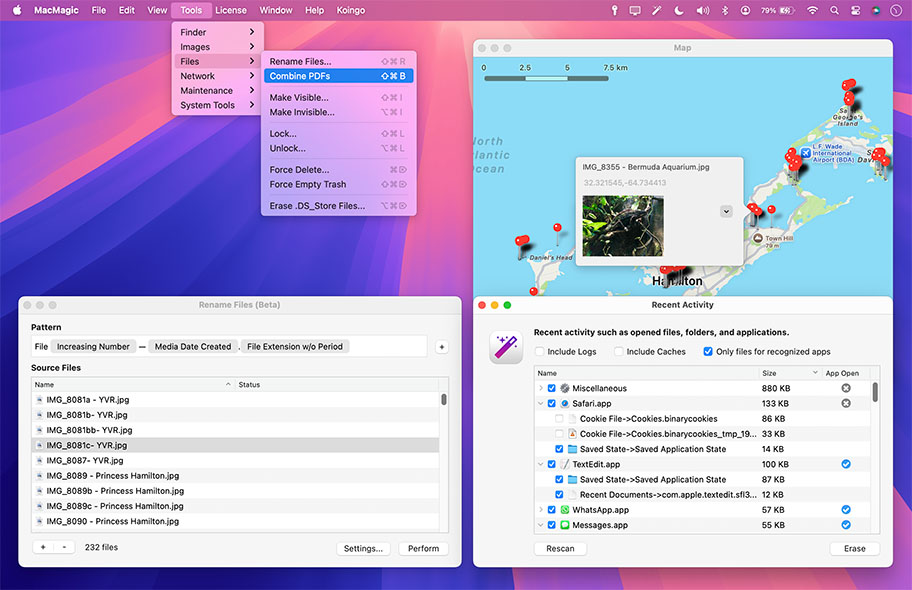
MacMagic can help clear up gigabytes of lost storage space crowded up by the caches of poorly optimized apps, hide and show hidden files in the Finder, help force-delete the contents of the Trash or stubborn files, combine and compress PDFs, convert image formats, batch rename files, and perform various other tasks to help automate or simplify your daily workflow!


Batch scale, rotate and convert images between over 100 formats. Convert, resize, compress videos as well!
Quickly and easily identify and purge excessively large app caches and logs, as well as erasing recent application history.
Show or hide desktop icons, visify or invisify specific files and folders, or globally turn on the ability to see all hidden files.
Missing Features Found
While Apple does do an awesome job at creating stellar products, they occasionally leave critically important features out! MacMagic comes to the rescue and helps bridge the gap.
We are continually evolving the product. It's an app by users, for users! Write in if there's a redundant task that you feel could be better automated on the Mac.
Other Highlights
Quit & Restart Finder
Whether you're trying to save RAM and CPU time, or are fighting a pesky bug, easily fully quit and/or restart the Finder.
Force Delete
Pesky files can sometimes evade deletion using the built-in Trash feature. Escalate to super-user privileges and eliminate them.
Combine & Compress PDFs
Use our Combine PDFs feature to easily convert any image file to PDF format (the web standard for documents), or add and remove pages from existing documents. Even compress PDFs to save disk space!
Batch Rename Files
Rename files in bulk including tokens in the file name, such as a date a photo was taken or other meta data!
Disconnect WiFi
Disconnect from the current WiFi network without turning off WiFi entirely.
Show on Map
Show a selection of files on a visual Map based on the GPS information in their meta data!
System Tools
Easily access hidden system tools buried deep within macOS such as Screen Sharing, Certificate Utility, File Merge and more.
Lock Files
Recursively lock or unlock entire folders worth of files.
Plain Text Editor
A lightweight text editor with Find & Replace, word count, line numbers, invisibles, and cleanup tools for gremlins and trailing whitespace.
Browse SQLite Databases
View and navigate the contents of SQLite databases.
Browse XML & JSON Files
View and navigate visually.
QR Code Generator
Create custom QR codes for vCards, locations, Wi-Fi, SMS, emails, and more.
Browse SQLite Databases
View and navigate the contents of SQLite databases.
Browse XML & JSON Files
View and navigate files visually.
Clear Caches
Erase system and application caches to save disk space.
Clear Disk Cache
Resets physical disk cache.
Clear DNS Cache
Flush the DNS cache, forcing domains to be re-resolved.
Clear Logs
Erase system and application logs to save disk space.
Clear Recent Activity
Wipe out recently opened documents and other logs of app activity.
Combine & Compress PDFs
Combine, compress, re-order, and delete pages from PDFs.
Convert Media Formats
Batch convert image and video formats from one file format to another.
Disconnect WiFi
Disconnect from the current WiFi network without turning off WiFi entirely.
Erase .DS_Store Files
Erase the invisible .DS_Store window settings files from folders in bulk.
Force Delete
Stubborn file? Force its removal with admin access.
Force Empty Trash
Empty trash using admin access.
Hide Desktop Icons
Prevent icons from showing up on the Desktop.
Home Screen
Home screen launch area to pin files or folders and access our tools.
Lock Files
Lock or unlock files in bulk.
Make Files Invisible
Toggle the visibility of files.
Plain Text Editor
Fast, lightweight editor with Find & Replace, word count, line numbers, invisibles, clearing gremlins and whitespace, and word wrap.
QR Code Generator
Create custom QR codes for vCards, locations, Wi-Fi, SMS, emails, and more.
Quit Finder
Quit the Finder without relaunching.
Rename Files
Batch rename files with tokenized names.
Resize Images
Batch resize images.
Restart Finder
Force-Restart the Finder.
Rotate Images
Batch rotate images.
Show Hidden Files
Show hidden files visibly in the Finder.
Show on Map
Show files containing GPS meta data on a visual map.
System Tools
Easy access to launch system tools hiding deep within macOS.
For the full or demo version of our app, please use the download links below. After installation, the demo will automatically begin. For existing owners, unlock the app via the "Unlock..." menu item.
Current Version
All current versions of Koingo apps are compatible with the latest version of macOS or Windows (when applicable), Apple Silicon, support 64-bit architecture, and are optimized for Retina (HiDPI) Display. These retail versions of our apps are intentionally not sandboxed to provide the most flexible user experience. For sandboxed versions, see our App Store editions.

Older Versions
These versions are no longer supported and are listed primarily for customers with older licenses.
Useful tool

George Mina
A nice tool that has been with me for years.
Ralph Lorenscheit
Great little app. It combines pdfs, converts images, clears caches and a whole bunch of other stuff all for just pennies on the dollar.
Henry Halem
Simple little product that brings some things together in one spot. I don't use it everyday but it is very handy when needed. I also like to support independent software developers like Koingo. I have several of their products that just make things easier.
Mark Strickland
I enjoy the easy deleting of cache-files and logs...Gives me back some space ;)
Lukas
convienient, just features often
Evan Autenreith
Very Good App
Tom Dimou
The text editor is easy to use, though not as feature-rich as BBEdit. Still a decent text editor. I like the word and character count and the line numbering. My favorite feature of MacMagic is the QR code generator. Easy to use and so much fun!
Megga
I use MacMagic daily on my Mac and works great
Ron Smith
This offers a quick way to access many of the important functions of MacPilot, and finding it quite useful.
Mark Smith
All of our products come with a full set of licensing options: from single users and households to small businesses and larger corporations.
Personal Licenses
Student/Senior
-
1 computer2 unique devices per year
Solo
-
1 computer/user5 unique devices per year
Household
-
1 household10 unique devices per year
Business Licenses
School
-
1 school300 unique devices per year
Small Business
-
10 computers/users60 unique devices per year
Corporate
-
Unlimited10000 unique devices per year
Our manual is always expanding! While we strongly believe our products as so intuitive you shouldn't need a manual, there are exceptions now and then. If you feel there is something missing from the documentation, please contact us.
For a single-page listing of all help entries, click here.
| Version 1.9.5 – March 8, 2026 | |
|
Requirements This version requires at least macOS 11 (Big Sur from Fall 2020). We have all older versions available for download on our web site. Please use the one designed for your operating system. A current, valid, license for any Koingo app will unlock all previous versions. |
|
| Upgrade Notes This upgrade is free for users owning the current major version, an active subscription, Utility Package Pro, or a "lifetime license." No action is required other than downloading the new version from our web site and unlocking as normal with an e-mail address. For all other users, orders for the current version can be purchased on our web site. |
|
| Bug Fix: | Menu items not appearing in MacMagic menu and appeared in Help instead. |
| Bug Fix: | Now uses SMService for Logn Item. |
| Bug Fix: | License modal fix. |