
-
 Display Maestro 5Version 5.3Unlock access to all display resolutions of attached devices and bit depths.View Downloads Buy Now

Displays Unlocked
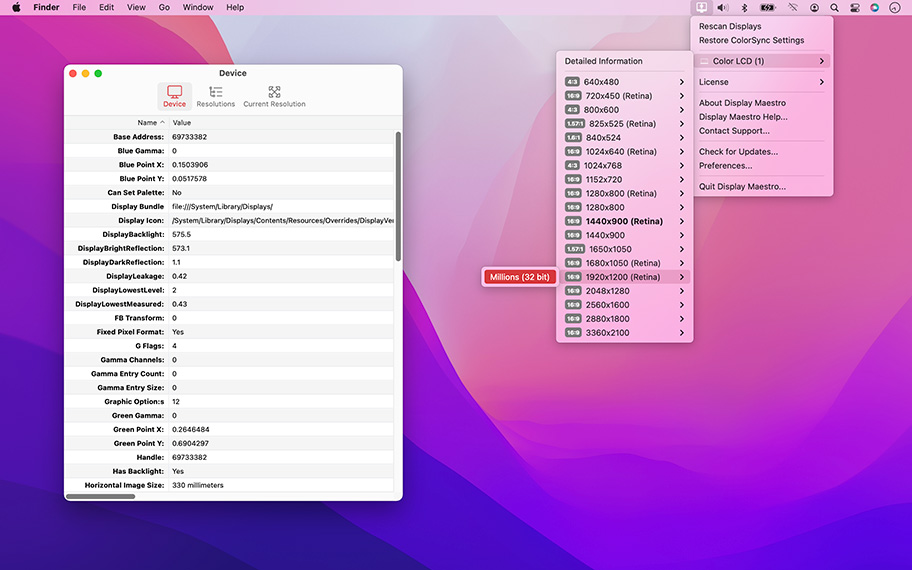
Display Maestro gives you full control over attached displays, allowing the use of all available resolutions and bit depths. Latest versions of macOS strip out the useful ability to set specific resolutions and presents a more user-friendly approach.
Experienced users, especially graphic designers and presenters, demand more precise control of their devices. Access exactly the resolution you need with Display Maestro's traditional Mac-like menu.

Access the full list of resolutions and bit-depths supported by the graphics card and attached display. Note that some graphics cards may limit the display's options.
Older games and apps sometimes require the use of precise resolutions, and can no longer set these automatically due to changes in macOS. Display Maestro lets you pick exactly the configuration you need.
Display Maestro implements functionality that will detect if an unsafe resolution was chosen and will automatically revert to the last known safe resolution if confirmation is not given.
Details Unveiled
Pro users can also view advanced resolution and device information ranging from gamma configuration, RGB color points, scaling, samples per pixel, screen dimensions, device vendor IDs, refresh rate, manufacture dates, dots per inch, Retina (HiDPI) status, and more.
Also view feature information such as if the following are enabled are supported: pan enabled, simulscan enabled, is stretched, television mode, Desktop GUI support, interlace mode, mirroring supported, built-in, high-resolution capable, accelerator backed, and more.
All Resolutions
Display list of all displays and resolutions.
Capabilities
View display capabilities like backlist, mirroring, digital, stereo, OpenGL acceleration, HiDPI capable, and AirPlay.
ColorSync
Restore ColorSync settings.
Gamma
View the white, red, green, and blue gamma values as well as channels
Hidden Resolutions
Toggle list of unsafe resolutions.
Manufacturer
View vendor codes and manufacture dates.
Properties
View display properties simulscan, television mode, samples per pixel, pan required, display size, interlaced, bytes per row, bits per sample, and more.
RGB Points
View the red, green and blue X,Y points.
Transformation
View display transformation values.
For the full or demo version of our app, please use the download links below. After installation, the demo will automatically begin. For existing owners, unlock the app via the "Unlock..." menu item.
Current Version
All current versions of Koingo apps are compatible with the latest version of macOS or Windows (when applicable), Apple Silicon, support 64-bit architecture, and are optimized for Retina (HiDPI) Display. These retail versions of our apps are intentionally not sandboxed to provide the most flexible user experience. For sandboxed versions, see our App Store editions.

Older Versions
These versions are no longer supported and are listed primarily for customers with older licenses.
Mac Edition
- Minimum OS: macOS 10.14 or later
Mac Edition
- Minimum OS: Mac OS X 10.7 (Intel)
Does exactly what it's advertised to do. Very responsive developer, too. In my opinion this is an essential Mac app as it brings back features that Apple has taken away over the years and puts them back to use. Can't argue there. Absolutely recommended.

Kyle Fox
I was upset when Apple decided to remove 256-color in Leopard. This app fixed my problem right away. The best part about it is that it just feels like an extension of the OS itself. Very well done and totally worth the five bucks.
Kodie Rossi
To have the big resolution on small screen is the best way to upgrade your screen size without change the screen itself.. Thank you very much for the innovation!! This is COOLL!!
Paskia
It works fine! I´m satisfied.
Felix Jean-Pierre Felixine
Excellent software, helps use the full scale of my Retina display
Olivier Brunet
I'm usually wary about third-party apps that screw around with your settings, but this one is good. Everything reverts back to normal once you quit the app so you don't have to worry about permanently botching something up. A great addition to an already great operating system.
Max Rosenberg
Great for playing old games! I'm a huge legacy gamer so this app is perfect. There's nothing worse than trying to play an old game in the wrong resolution. It feels like a default Mac function too, the way it just sits up there in the top bar. Love it.
Kaylee Harrington
Great tool for testing!
Carlos Garro
It is a very useful item , It adjust to the available proyector easy
Jorge A Diaz
This app does what it says. It allows me to configure my retina display 15 inch Macbook Pro to the same rez as the 30 Inch Cinema Display. That way I can use them as the same area in size. But what I really like is. When I mirror the displays, while I am on the go with just the rMBP, the items and apps that place items on the desktop all stay in place. Such a time saver and hassle reducer! Thank you for making Display Maestro!
David B
All of our products come with a full set of licensing options: from single users and households to small businesses and larger corporations.
Personal Licenses
Student/Senior
-
1 computer2 unique devices per year
Solo
-
1 computer/user5 unique devices per year
Household
-
1 household10 unique devices per year
Business Licenses
School
-
1 school300 unique devices per year
Small Business
-
10 computers/users60 unique devices per year
Corporate
-
Unlimited10000 unique devices per year
Our manual is always expanding! While we strongly believe our products as so intuitive you shouldn't need a manual, there are exceptions now and then. If you feel there is something missing from the documentation, please contact us.
For a single-page listing of all help entries, click here.
| Version 5.3 – December 11, 2025 | |
|
Requirements This version requires at least macOS 11 (Big Sur from Fall 2020). We have all older versions available for download on our web site. Please use the one designed for your operating system. A current, valid, license for any Koingo app will unlock all previous versions. |
|
| Upgrade Notes This upgrade is free for users owning the current major version, an active subscription, Utility Package Pro, or a "lifetime license." No action is required other than downloading the new version from our web site and unlocking as normal with an e-mail address. For all other users, orders for the current version can be purchased on our web site. |
|
| New Feature: | New Preferences window option to remember desktop icon positions. |
| New Feature: | Debug Log. |