-
 Data Guardian 7Version 7.9.2Data Guardian allows you to secure your logins, passwords, addresses, notes, credit card numbers, receipts, and other information in a customizable database with up to 448-bits of Blowfish encryption!View Downloads Buy Now
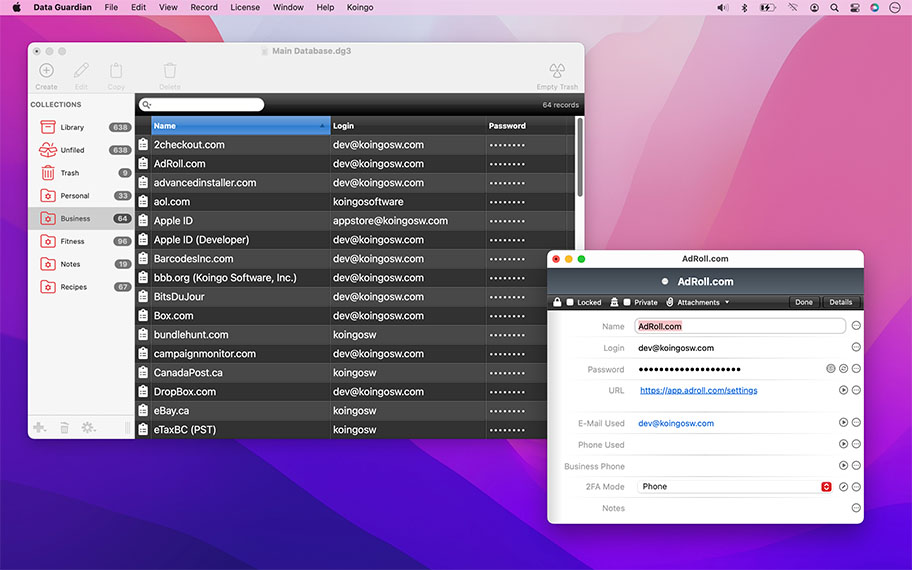
Secure & Beautiful
Leaving post-it notes attached to your monitor to remember passwords is a major security risk! In a world plagued by privacy concerns, trust in Data Guardian's 448-bit strong Blowfish encryption to keep your mind at ease!
The flexible and intuitive design of Data Guardian makes entering a wide range of data a breeze. Address books, passwords, credit card numbers, shopping lists, or even journal entries! On the go? Grab Data Guardian for iOS! Even automatically generate 2FA/OTP on-demand.


Have you created record that has a selection of fields you will use on a regular basis? Save it as a preset. Later, create new blank records with the fields you've chosen already added!
Export data to macOS's Passwords.app to always have your passwords with you when you need them.
Create regular collections to sort records, or have Data Guardian automatically manage that for you with Smart Collections! Set up matching criteria and records will be automatically sorted for you.
Custom Tailored
Every record in databases can be custom-tailored to suit the type of information entered. Select from one of many different field types such as: dates, phone numbers, e-mail address, web address, dropdown menus, checkboxes and more.
Beyond simply storing data, phone numbers can be dialled directly from within the app, web fields launch in your preferred web browser, and e-mail addresses open in your default mail client.
Other Highlights
Password Generator
Are you having trouble thinking of a good password when signing up somewhere new? Specify a format and generate fresh random passwords on the fly!
Quick Browser
Do you want quick access to your entire password repertoire while in any app? The Quick Browser floats over top of all windows and allows you to quickly browse your database.
Import & Export
Easily import from common formats like text, CSV, vCards, Address Book and more. Export to CSV (for Passwords.app), HTML, or plain text.
Attachments
Integrate files right into the database! Attach pictures, documents, music or more to any record. Attachments are saved securely within the confines of the database.
Backup
Databases are automatically saved every few minutes to prevent data loss incase of a crash. Not enough for you? Print out a beautiful hard copy of all of your records!
Cross-platform
One database works interchangeably between both the Mac and PC versions.
Auto-save
Databases can auto-save so that changes are never lost.
Bulk Edit
Apply changes to a selection of records at the same time.
Cross-platform
Interchangeable database format between the Mac and PC version.
Export
Export your database to a flat-text file for use in other programs.
Import
Import virtually any flat-text file and map it to custom fields.
Limitless
Create unlimited records, collections, and fields!
Log
Record application activity to a log.
Password Generator
Dynamically generate passwords based on a user specified algorithm.
Phone Integration
Dial phone numbers directly from records.
Photo-Ready
Insert pictures into records.
Printing
Print a sheets of record information in a variety of formats.
Privacy
Auto-clear clipboard or quit the app after a specified interval.
Quick Browser
Access to Data Guardian from within any application.
Security
Up to 448-bit Blowfish encryption.
Synchronization
Sync databases together to merge and update.
For the full or demo version of our app, please use the download links below. After installation, the demo will automatically begin. For existing owners, unlock the app via the "Unlock..." menu item.
Current Version
All current versions of Koingo apps are compatible with the latest version of macOS or Windows (when applicable), Apple Silicon, support 64-bit architecture, and are optimized for Retina (HiDPI) Display. These retail versions of our apps are intentionally not sandboxed to provide the most flexible user experience. For sandboxed versions, see our App Store editions.

Data Guardian for PC
Version 7.9.2
Released March 8, 2026
Windows 10 (1903 from May 2019) or later
Older Versions
These versions are no longer supported and are listed primarily for customers with older licenses.
Mac Edition
- Minimum OS: macOS 10.14 (Mojave); Intel/ARM: 64-bit
- Maximum OS: Appears to still run on macOS 15 (Sequoia)
Mac Edition
- Minimum OS: macOS 10.13 (High Sierra); Intel: 64-bit
- Maximum OS: Appears to still run on macOS 15 (Sequoia)
PC Edition
- Minimum OS: Windows 7 SP1 or later
- Maximum OS: Appears to still run on macOS 15 (Sequoia)
Mac Edition
- Minimum OS: Mac OS X 10.10 (Yosemite); Intel: 64-bit
- Maximum OS: Appears to still run on macOS 15 (Sequoia)
Mac Edition
- Minimum OS: Mac OS 10.10 (Yosemite); Intel: 64-bit
- Maximum OS: Appears to still run on macOS 15 (Sequoia)
Mac Edition
- Minimum OS: Mac OS X 10.4 (Tiger); PowerPC/Intel: 32-bit
So far so good. I upgraded to Yosemite & needed to replace Password Retriever. I got Data Guardian and it does what I want. Simple, Easy. Thanks guys!

John Boyarsky
It fulfills all of my data management needs, and is easy to use and navigate. What more can I say?
Peter Ledwon
I love Data Guardian. I'm a website designer, and I have lots of passwords for not only myself, but all my clients. Data Guardian helps me organize my passwords and other information by client, which is really helpful.
Eliana
I now use DataGuardian for a few years. All passwords, website logins, bank and credit card codes, phonecodes, etc. are in a self-made template. A copy of the database is on my iPhone that is being synchronized weekly. Very useful and user-friendly program.
Bob Vannieuwenhuyse
Great product!! Been using it to simplify my computerized life for years now! Thanks a bunch!
Tim Hollister
good for storing myriad passwords.
Bill White
Overall I'm very happy with DG 3. The only thing that could be improved is better integration with other software like web browsers.
Thomas Strahl
It helps me keep track of my UserID and Passwords for all of the software that I purchase online. I like buying small utility app-bundles and therefore there is a lot of info to track about the vendors and also about my registration info. Data Guardian helps me organize under different libraries for tracking my vendors for quick and easy retrieval for all that important info that I cannot remember and it neatly stores it in one safe location. I also love the continuous update alerts as a registered user that Koingo does to keep improving your products. I am glad that I do not have to pay for all those upgrades and I benefit from all the wonderful new features Koingo keeps rolling out. Keep up the excellent work on refining Data Guardian. Best regards, GL
Gee Chung Lam
I find this product superb. I have three databases set up in my Mac, and I use them for different things. One, I use it to organize my files and web sites. It makes for a secure web browsing experience. All of my favorite URL's a locked in a database. Two, I keep my secure information in it. My 401k account information, my checking, and my savings statements are all locked up in another database, linked to the database with the URL's and a password file. Easy to due, and it makes everything secure. Three, I write. I have had some short stories published. I keep the word docs locked in a third database. This is a really nice product that is simple to use and secure. I recommend it heartily.
Robert Spotts
Great app, always improving. I really like how Koingo actually listens to their customer's suggestions and integrates them into the updates. I'm always looking forward to seeing new tweaks in the upcoming Data Guardian releases.
Riley Brooks
All of our products come with a full set of licensing options: from single users and households to small businesses and larger corporations.
Personal Licenses
Student/Senior
-
1 computer2 unique devices per year
Solo
-
1 computer/user5 unique devices per year
Household
-
1 household10 unique devices per year
Business Licenses
School
-
1 school300 unique devices per year
Small Business
-
10 computers/users60 unique devices per year
Corporate
-
Unlimited10000 unique devices per year
Our manual is always expanding! While we strongly believe our products as so intuitive you shouldn't need a manual, there are exceptions now and then. If you feel there is something missing from the documentation, please contact us.
For a single-page listing of all help entries, click here.
| Version 7.9.2 – March 8, 2026 | |
|
Requirements This version requires at least macOS 11 (Big Sur from Fall 2020) or Windows 10 (1903 from May 2019). We have all older versions available for download on our web site. Please use the one designed for your operating system. A current, valid, license for any Koingo app will unlock all previous versions. |
|
| Upgrade Notes This upgrade is free for users owning the current major version, an active subscription, Utility Package Pro, or a "lifetime license." No action is required other than downloading the new version from our web site and unlocking as normal with an e-mail address. For all other users, orders for the current version can be purchased on our web site. |
|
| Bug Fix: | License entry fix. |
| Bug Fix: | CSV import fix. |