-
 MacPilot 18Version 18.0.1Scared of the terminal or can't be bothered to remember those commands to customize your system the way you want? MacPilot is your digital savior. Easily enable and disable hidden features in macOS.View Downloads Buy Now
Power Unlocked
With the power of Unix and the simplicity of Macintosh, you have a phenomenal amount of untapped power in your hands! Use MacPilot to unlock over 1,200 features, and access them all with the easy and familiar Macintosh user interface. No command line tools or complicated file operations!
Display hidden files in the Finder, disable the startup chime, add spacers and stacks to the Dock, change the screenshot file format, run maintenance tools, tweak network settings, force empty the Trash, and tons more. Keep yourself in awe and busy for days as you discover how much macOS has "under the hood".


We have gone to great lengths to incorporate a large volume of in-program assistance within MacPilot. Don't know what something does? Just hover over it with the mouse!
Do you manage a lab and want the same configuration across multiple computers? Create "save points" and deploy them on any number of computers.
Configured something by mistake and want it back to factory settings? Simply right-click the feature and choose "Set to Default" or click the main "Reset All" button on each tab.
The Wow Factor
Get out of the passenger seat and take control of your Mac. Set your login window picture, use the screensaver as your Desktop, modify advanced file permissions (ACL), change the system welcome message, enable simultaneous recordings in QuickTime, view system logs, or enable the Debug menu in numerous apps.
Or perhaps you're feeling the need for a simpler lifestyle? Disable the Notification Centre, virtual memory, Dashboard and iCloud saving. Ditch time-wasting graphical animations, prevent system sleep, suspend Safari's web caching, disable App Nap, remove the downloaded files warning message, and more!
Other Highlights
System Profile
A beautiful system profile that outlines advanced system information. Everything from the graphics card and RAM bus speeds to the system serial number and processor info.
Reference
View a complete list of network ports, error codes, and key combos. Browse fonts, and preview Unix command manuals in a redesigned, substantially prettier manuals viewer with modern searching.
Disk Details
View advanced disk information and statistics such as Unix node path, free blocks, device block size, file count, folder count, mount point, file system type, solid state status, and a plethora of other BSD-level informational trinkets.
Maintenance
Optimize and repair your system with powerful maintenance tools. Rebuild Launch Services, rotate system logs, clear caches including QuickLook, force empty the Trash, reset common system databases, and more.
Single-Click Access
Easily access assistants and tools that are normally buried deep in the system, including an enhanced Menu Extras manager for organizing and controlling menu bar items.
File Browser
Browse the computer while showing all invisible and system files. Includes new power-user navigation shortcuts, copy-path to clipboard, and complete control over advanced settings like extended attributes, POSIX and ACL permissions, and hard locks.
Network Utility
A modern replacement for Apple’s retired Network Utility. Ping, traceroute, port scan, whois, active connections, and a powerful DNS Lookup tool with modern record types and built-in SPF, DMARC, and DKIM modes.
I/O Benchmark
Benchmark storage performance quickly and clearly. Great for validating new drives, troubleshooting slowdowns, and comparing external enclosures or cables.
Sysctl Config Editor
Edit sysctl configuration with a purpose-built editor for advanced tuning. A clean workflow for reviewing, updating, and maintaining system parameter overrides.
Advanced
Explore hundreds of additional (and often undocumented) tweaks, including legacy and power-user options across many macOS generations.
Automation
Save a system configuration for easy deployment across numerous systems or after a system restore.
Disk Info
View incredibly detailed information about connected disks, from free blocks and device tree path to journal offsets, RAID status, and deeper BSD-level details.
Disk Utility
Reveal additional Disk Utility capabilities and hidden options, including visibility of internal volumes and advanced disk operation controls designed for power users.
Dock
Add spacers and smart stacks/menus, show only open apps, lock settings, toggle the open app indicator light, fade icons for hidden apps, and change many other interface effects and features.
Easy Access
One-click access to internal system tools like the Bluetooth, Certificate, RAID, or Directory assistant, plus an enhanced Menu Extras manager and improved system viewers.
File Browser
Quickly browse and edit advanced details for files and folders with a refreshed, more native UI. Includes Command-arrow navigation, copy-path to clipboard, and complete control over permissions including Access Control Lists.
File Tools
Force erase files, lock files, visify/invisify, merge folders, clear ACL data, create symbolic links, and wipe Quarantine data.
Finder
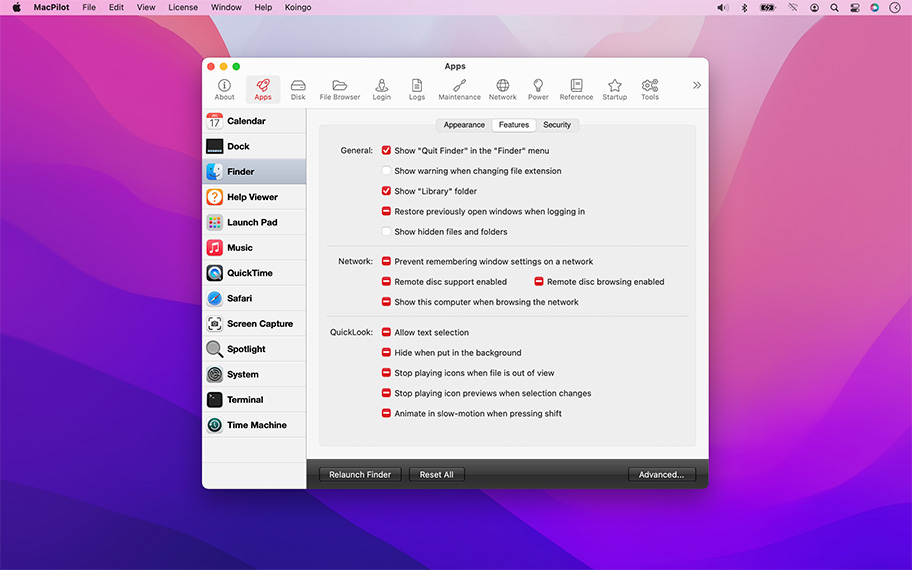
Toggle animations, show hidden files, show compression options when holding Option, hide iOS devices in the Finder sidebar, show the QuickLook toolbar in Columns view, disable auto-resizing of Columns view, and more.
Fully Loaded
Unlock over 1,200 features to tweak, tune, and explore macOS with a familiar, easy interface.
Info
View ports, error codes, fonts, key combos, system configuration details, and Unix command manuals in a substantially prettier manuals viewer.
Login Window
Set the welcome text, enable a startup delay, change the number of retries before hint, disable the power buttons, enable Kiosk mode, disable console access, auto-lock the screen when logging in, show system users, require manual username entry, edit login items and launch agents.
Maintenance
Run essential maintenance tools including rebuilding Launch Services, clearing caches such as QuickLook, rotating system logs, clearing the print queue, and more.
Music.app
Enable half-star ratings, disable elastic scrolling, play songs while importing, disable device access, enable a high contrast interface, prevent update checking when devices are connected and more.
Network
Discover advanced network device and configuration details beyond an IP address: DNS, IPv4, IPv6, proxies, Samba, and File Sharing. Includes an advanced DNS Lookup tool with modern record types and guided SPF, DMARC, and DKIM modes.
Network Utility
A modern replacement for Apple’s retired Network Utility: ping, traceroute, port scan, whois, active connections, and advanced DNS lookups.
Power
Complete control over wake, sleep, and power saving. Includes Low Power Mode controls plus advanced waking options like TCP Keep Alive and Proximity Dark Wake.
Safari
Disable spell checking, set Find on Page to use 'starts with' instead of 'contains', disable site icons, disable caching, show the Develop or Debug menu, change the User Agent string, make the Delete key go back to the previous page, and more!
Slim Apps
A completely overhauled architecture slimmer for Universal apps. Extract only the PowerPC, Intel, or Apple Silicon slice when needed.
Startup
Force safe startup mode or 32/64-bit, enable kernel debugging, limit system RAM, mute the startup chime, disable kernel caches, and toggle a variety of other advanced Unix options.
Tools
Run an I/O Benchmark and edit sysctl configuration with a purpose-built editor for advanced tuning and diagnostics.
For the full or demo version of our app, please use the download links below. After installation, the demo will automatically begin. For existing owners, unlock the app via the "Unlock..." menu item.
Current Version
All current versions of Koingo apps are compatible with the latest version of macOS or Windows (when applicable), Apple Silicon, support 64-bit architecture, and are optimized for Retina (HiDPI) Display. These retail versions of our apps are intentionally not sandboxed to provide the most flexible user experience. For sandboxed versions, see our App Store editions.

Older Versions
These versions are no longer supported and are listed primarily for customers with older licenses.
Mac Edition
- Minimum OS: macOS 13 (Ventura)
- Maximum OS: macOS 15 (Sequoia)
Mac Edition
- Minimum OS: macOS 13 (Ventura)
- Maximum OS: macOS 15 (Sequoia)
Mac Edition
- Minimum OS: macOS 10.15 (Catalina)
- Maximum OS: macOS 14 (Sonoma)
Mac Edition
- Minimum OS: macOS 10.15 (Catalina)
- Maximum OS: macOS 14 (Sonoma)
Mac Edition
- Minimum OS: macOS 10.15 (Catalina)
- Maximum OS: macOS 14 (Sonoma)
Mac Edition
- Minimum OS: macOS 11 (Big Sur)
- Maximum OS: macOS 13 (Ventura)
Mac Edition
- Minimum OS: macOS 11 (Big Sur)
- Maximum OS: macOS 13 (Ventura)
Mac Edition
- Minimum OS: macOS 11 (Big Sur)
- Maximum OS: macOS 13 (Ventura)
Mac Edition
- Minimum OS: macOS 10.15 (Catalina) or later
Mac Edition
- Minimum OS: macOS 11 (Big Sur)
- Maximum OS: macOS 12 (Monterey)
Mac Edition
- Minimum OS: macOS 11 (Big Sur)
- Maximum OS: macOS 12 (Monterey)
Mac Edition
- Minimum OS: macOS 11 (Big Sur)
- Maximum OS: macOS 12 (Monterey)
Mac Edition
- Minimum OS: macOS 11 (Big Sur)
- Maximum OS: macOS 11 (Big Sur)
Mac Edition
- Minimum OS: macOS 11 (Big Sur)
- Maximum OS: macOS 11 (Big Sur)
Mac Edition
- Minimum OS: macOS 11 (Big Sur)
- Maximum OS: macOS 11 (Big Sur)
Mac Edition
- Minimum OS: macOS 10.15 (Catalina)
- Maximum OS: macOS 10.15 (Catalina)
Mac Edition
- Minimum OS: macOS 10.15 (Catalina)
- Maximum OS: macOS 10.15 (Catalina)
Mac Edition
- Minimum OS: macOS 10.15 (Catalina)
- Maximum OS: macOS 10.15 (Catalina)
Mac Edition
- Minimum OS: macOS 10.13 (High Sierra)
- Maximum OS: macOS 10.15 (Catalina)
Mac Edition
- Minimum OS: macOS 10.13 (High Sierra)
- Maximum OS: macOS 10.15 (Catalina)
Mac Edition
- Minimum OS: macOS 10.13 (High Sierra)
- Maximum OS: macOS 10.15 (Catalina)
Mac Edition
- Minimum OS: macOS 10.13
Mac Edition
- Minimum OS: macOS 10.13
Mac Edition
- Minimum OS: macOS 10.13
Mac Edition
- Minimum OS: macOS 10.13
Mac Edition
- Minimum OS: macOS 10.13
Mac Edition
- Minimum OS: macOS 10.12 (Sierra)
- Maximum OS: macOS 10.14 (Mojave)
Mac Edition
- Minimum OS: macOS 10.12 (Sierra)
- Maximum OS: macOS 10.14 (Mojave)
Mac Edition
- Minimum OS: macOS 10.12 (Sierra)
- Maximum OS: macOS 10.14 (Mojave)
Mac Edition
- Minimum OS: macOS 10.12 (Sierra)
- Maximum OS: macOS 10.13 (High Sierra)
Mac Edition
- Minimum OS: macOS 10.12 (Sierra)
- Maximum OS: macOS 10.13 (High Sierra)
Mac Edition
- Minimum OS: macOS 10.12 (Sierra)
- Maximum OS: macOS 10.13 (High Sierra)
Mac Edition
- Minimum OS: Mac OS X 10.10 (Yosemite)
- Maximum OS: macOS 10.12 (Sierra)
Mac Edition
- Minimum OS: Mac OS X 10.10 (Yosemite)
- Maximum OS: macOS 10.12 (Sierra)
Mac Edition
- Minimum OS: Mac OS X 10.10 (Yosemite)
- Maximum OS: macOS 10.12 (Sierra)
Mac Edition
- Minimum OS: macOS 10.10 (Intel)
Mac Edition
- Minimum OS: macOS 10.10 (Intel)
Mac Edition
- Minimum OS: macOS 10.10 (Intel)
Mac Edition
- Minimum OS: macOS 10.10 (Intel)
Mac Edition
- Minimum OS: macOS 10.10 (Intel)
Mac Edition
- Minimum OS: Mac OS 10.10 (Intel)
Mac Edition
- Minimum OS: Mac OS 10.10 (Intel)
Mac Edition
- Minimum OS: Mac OS X 10.7 (Lion)
- Maximum OS: macOS 10.12 (Sierra)
Mac Edition
- Minimum OS: Mac OS X 10.7 (Lion)
- Maximum OS: macOS 10.12 (Sierra)
Mac Edition
- Minimum OS: Mac OS X 10.7 (Lion)
- Maximum OS: macOS 10.12 (Sierra)
Mac Edition
- Minimum OS: Mac OS X 10.7 Intel (Lion)
- Maximum OS: Mac OS X 10.11 (El Capitan)
Mac Edition
- Minimum OS: Mac OS X 10.7 Intel (Lion)
- Maximum OS: Mac OS X 10.11 (El Capitan)
Mac Edition
- Minimum OS: Mac OS X 10.7 Intel (Lion)
- Maximum OS: Mac OS X 10.11 (El Capitan)
Mac Edition
- Minimum OS: macOS 10.7 (Intel)
Mac Edition
- Minimum OS: macOS 10.7 (Intel)
Mac Edition
- Minimum OS: macOS 10.7 (Intel)
Mac Edition
- Minimum OS: macOS 10.7 (Intel)
Mac Edition
- Minimum OS: macOS 10.7 (Intel)
Mac Edition
- Minimum OS: Mac OS 10.7 (Intel)
Mac Edition
- Minimum OS: Mac OS 10.7 (Intel)
Mac Edition
- Minimum OS: Mac OS 10.7 (Intel)
Mac Edition
- Minimum OS: Mac OS 10.7 (Intel)
Mac Edition
- Minimum OS: Mac OS X 10.6 Intel (Snow Leopard)
- Maximum OS: Mac OS X 10.9 (Mavericks)
Mac Edition
- Minimum OS: Mac OS X 10.6 Intel (Snow Leopard)
- Maximum OS: Mac OS X 10.9 (Mavericks)
Mac Edition
- Minimum OS: Mac OS X 10.6 Intel (Snow Leopard)
- Maximum OS: Mac OS X 10.9 (Mavericks)
Mac Edition
- Minimum OS: macOS 10.6 (Intel)
Mac Edition
- Minimum OS: macOS 10.6 (Intel)
Mac Edition
- Minimum OS: macOS 10.6 (Intel)
Mac Edition
- Minimum OS: macOS 10.6 (Intel)
Mac Edition
- Minimum OS: macOS 10.6 (Intel)
Mac Edition
- Minimum OS: Mac OS 10.6 (Intel)
Mac Edition
- Minimum OS: Mac OS 10.6 (Intel)
Mac Edition
- Minimum OS: Mac OS 10.6 (Intel)
Mac Edition
- Minimum OS: Mac OS 10.6 (Intel)
Mac Edition
- Minimum OS: Mac OS X 10.4 Intel (Tiger)
- Maximum OS: Mac OS X 10.9 Mavericks
Mac Edition
- Minimum OS: Mac OS X 10.4 Intel (Tiger)
- Maximum OS: Mac OS X 10.9 Mavericks
Mac Edition
- Minimum OS: Mac OS X 10.4 Intel (Tiger)
- Maximum OS: Mac OS X 10.9 Mavericks
Mac Edition
- Minimum OS: macOS 10.6 (Intel)
Mac Edition
- Minimum OS: macOS 10.6 (Intel)
Mac Edition
- Minimum OS: macOS 10.6 (Intel)
Mac Edition
- Minimum OS: macOS 10.6 (Intel)
Mac Edition
- Minimum OS: macOS 10.6 (Intel)
Mac Edition
- Minimum OS: Mac OS 10.6 (Intel)
Mac Edition
- Minimum OS: Mac OS 10.6 (Intel)
Mac Edition
- Minimum OS: Mac OS 10.6 (Intel)
Mac Edition
- Minimum OS: Mac OS 10.6 (Intel)
Mac Edition
- Minimum OS: Mac OS X 10.4 Intel (Tiger)
- Maximum OS: Mac OS X 10.9 (Mavericks)
Mac Edition
- Minimum OS: Mac OS X 10.4 Intel (Tiger)
- Maximum OS: Mac OS X 10.9 (Mavericks)
Mac Edition
- Minimum OS: Mac OS X 10.4 Intel (Tiger)
- Maximum OS: Mac OS X 10.9 (Mavericks)
Mac Edition
- Minimum OS: Mac OS X 10.4 PowerPC/Intel (Tiger)
- Maximum OS: Mac OS X 10.8 (Mountain Lion)
Mac Edition
- Minimum OS: Mac OS X 10.4 PowerPC/Intel (Tiger)
- Maximum OS: Mac OS X 10.8 (Mountain Lion)
Mac Edition
- Minimum OS: Mac OS X 10.4 PowerPC/Intel (Tiger)
- Maximum OS: Mac OS X 10.8 (Mountain Lion)
Mac Edition
- Minimum OS: Mac OS X 10.4 PowerPC/Intel (Tiger)
- Maximum OS: Mac OS X 10.7 (Lion)
Mac Edition
- Minimum OS: Mac OS X 10.4 PowerPC/Intel (Tiger)
- Maximum OS: Mac OS X 10.7 (Lion)
Mac Edition
- Minimum OS: Mac OS X 10.4 PowerPC/Intel (Tiger)
- Maximum OS: Mac OS X 10.7 (Lion)
Mac Edition
- Minimum OS: Mac OS X 10.4 PowerPC/Intel (Tiger)
- Maximum OS: Mac OS X 10.7 (Lion)
Mac Edition
- Minimum OS: Mac OS X 10.4 PowerPC/Intel (Tiger)
- Maximum OS: Mac OS X 10.7 (Lion)
Mac Edition
- Minimum OS: Mac OS X 10.4 PowerPC/Intel (Tiger)
- Maximum OS: Mac OS X 10.7 (Lion)
Mac Edition
- Minimum OS: Mac OS X 10.4 PowerPC/Intel (Tiger)
- Maximum OS: Mac OS X 10.6 (Snow Leopard)
Mac Edition
- Minimum OS: Mac OS X 10.4 PowerPC/Intel (Tiger)
- Maximum OS: Mac OS X 10.6 (Snow Leopard)
Mac Edition
- Minimum OS: Mac OS X 10.4 PowerPC/Intel (Tiger)
- Maximum OS: Mac OS X 10.6 (Snow Leopard)
Mac Edition
- Minimum OS: Mac OS X 10.4 PowerPC/Intel (Tiger)
- Maximum OS: Mac OS X 10.6 (Snow Leopard)
Mac Edition
- Minimum OS: Mac OS X 10.4 PowerPC/Intel (Tiger)
- Maximum OS: Mac OS X 10.6 (Snow Leopard)
Mac Edition
- Minimum OS: Mac OS X 10.4 PowerPC/Intel (Tiger)
- Maximum OS: Mac OS X 10.6 (Snow Leopard)
Mac Edition
- Minimum OS: macOS 10.5 (PPC/Intel)
Mac Edition
- Minimum OS: macOS 10.5 (PPC/Intel)
Mac Edition
- Minimum OS: macOS 10.5 (PPC/Intel)
Mac Edition
- Minimum OS: macOS 10.5 (PPC/Intel)
Mac Edition
- Minimum OS: macOS 10.5 (PPC/Intel)
Mac Edition
- Minimum OS: Mac OS 10.5 (PPC/Intel)
Mac Edition
- Minimum OS: Mac OS 10.5 (PPC/Intel)
Mac Edition
- Minimum OS: Mac OS 10.5 (PPC/Intel)
Mac Edition
- Minimum OS: Mac OS 10.5 (PPC/Intel)
Mac Edition
- Minimum OS: Mac OS X 10.4 PowerPC/Intel (Tiger)
- Maximum OS: Mac OS X 10.6 (Snow Leopard)
Mac Edition
- Minimum OS: Mac OS X 10.4 PowerPC/Intel (Tiger)
- Maximum OS: Mac OS X 10.6 (Snow Leopard)
Mac Edition
- Minimum OS: Mac OS X 10.4 PowerPC/Intel (Tiger)
- Maximum OS: Mac OS X 10.6 (Snow Leopard)
Mac Edition
- Minimum OS: Mac OS X 10.4 PowerPC/Intel (Tiger)
- Maximum OS: Mac OS X 10.5 (Leopard)
Mac Edition
- Minimum OS: Mac OS X 10.4 PowerPC/Intel (Tiger)
- Maximum OS: Mac OS X 10.5 (Leopard)
Mac Edition
- Minimum OS: Mac OS X 10.4 PowerPC/Intel (Tiger)
- Maximum OS: Mac OS X 10.5 (Leopard)
Mac Edition
- Minimum OS: Mac OS X 10.4 PowerPC/Intel (Tiger)
- Maximum OS: Mac OS X 10.5 (Leopard)
Mac Edition
- Minimum OS: Mac OS X 10.4 PowerPC/Intel (Tiger)
- Maximum OS: Mac OS X 10.5 (Leopard)
Mac Edition
- Minimum OS: Mac OS X 10.4 PowerPC/Intel (Tiger)
- Maximum OS: Mac OS X 10.5 (Leopard)
Mac Edition
- Minimum OS: Mac OS X 10.2 PowerPC (Jaguar)
- Maximum OS: Mac OS X (10.4 Tiger)
Mac Edition
- Minimum OS: Mac OS X 10.2 PowerPC (Jaguar)
- Maximum OS: Mac OS X (10.4 Tiger)
Mac Edition
- Minimum OS: Mac OS X 10.2 PowerPC (Jaguar)
- Maximum OS: Mac OS X (10.4 Tiger)
Even though it may look daunting, it is well worth trying. Fantastic customization that all users should have a go with.

Mathew J Walters
Very powerful utility
Miguel Angel Lopez
I am able to turn features on and off in one application.
Dwight D Henry
I was attracted to MacPilot because it allowed me to drag the login Launch items up and down to change the order of launching on Login.
Richard S. Bodman
It save's a lot of time for me. Thank's to KoingoSW.
M.Becker
The best utility for my MacPro for over a decade! Not like other utilities which whorl and twerl with no apparent change to my operating system.
Henry Mulzac
Definitely one of the best utilities I've used several years.
Jim Edmunds
Very useful in my daily work routines
Peter With
I feel like the word "tweak" is an understatement. You can do SO much with this application. More than you can even imagine. I promise you.
Riley Shore
It's amazing the level of customization you can do to a Mac with this app! I never thought it was possible.
Georges Gholam
All of our products come with a full set of licensing options: from single users and households to small businesses and larger corporations.
Personal Licenses
Student/Senior
-
1 computer2 unique devices per year
Solo
-
1 computer/user5 unique devices per year
Household
-
1 household10 unique devices per year
Business Licenses
School
-
1 school300 unique devices per year
Small Business
-
10 computers/users60 unique devices per year
Corporate
-
Unlimited10000 unique devices per year
Our manual is always expanding! While we strongly believe our products as so intuitive you shouldn't need a manual, there are exceptions now and then. If you feel there is something missing from the documentation, please contact us.
For a single-page listing of all help entries, click here.
| Version 18.0.1 – August 31, 2026 | |
|
Requirements This version requires at least macOS 13 (Ventura from 2022); however, it is designed specifically for macOS 27 (Golden Gate from 2026). We have all older versions available for download on our web site. Please use the one designed for your version of macOS. A current, valid, license for any Koingo app will unlock all previous versions. |
|
| Upgrade Notes This upgrade is free for users owning the current major version, an active subscription, Utility Package Pro, or a "lifetime license." No action is required other than downloading the new version from our web site and unlocking as normal with an e-mail address. For all other users, orders for the current version can be purchased on our web site. |
|
| Enhancement: | Improved file date handling so creation, access, and backup dates remain consistent with Finder and the current time zone. |
| Enhancement: | Improved the reliability and accuracy of command progress, failure, and cancellation reporting. |
| Enhancement: | Improved safety when editing protected preferences, property lists, logs, Trash contents, NVRAM settings, and login pictures. |
| Enhancement: | Improved the reliability of the Features Database, property list editor, Hex editor, File Browser, Manuals viewer, and I/O Benchmark. |
| Bug Fix: | File creation dates now display using the correct local time instead of appearing shifted by the time-zone offset. |
| Bug Fix: | File access and backup dates are now read and written using the correct modern date format. |
| Bug Fix: | Corrected the interpretation and creation of UTC timestamps used by Features Database items and collections. |
| Bug Fix: | Corrected preference handling for current-user, all-user, current-host, and all-host settings. |
| Bug Fix: | Corrected the user and host scope used when reading and writing color preferences. |
| Bug Fix: | Protected preference reads now use authorization when required and no longer mistake a failed read for a missing value. |
| Bug Fix: | Failed or malformed preference reads no longer risk replacing the other values in a preference dictionary. |
| Bug Fix: | Improved handling of arrays, dictionaries, dates, and other compound preference values. |
| Bug Fix: | Corrected two Safari preference choices that could generate malformed commands. |
| Bug Fix: | Adding Recent Apps to the Dock no longer replaces the existing persistent-apps list. |
| Bug Fix: | The Leave Open option now leaves the selected applications running as intended. |
| Bug Fix: | Application-quit operations no longer wait indefinitely for an application that refuses to terminate. |
| Bug Fix: | Progress windows now finish correctly when a required tool is missing or a command cannot be launched. |
| Bug Fix: | Commands returning an error are no longer incorrectly reported as successful. |
| Bug Fix: | Stopping a task no longer reports success or closes its progress window while the task is still running. |
| Bug Fix: | A task that ignores a stop request remains monitored instead of being replaced or abandoned. |
| Bug Fix: | Long-running privileged operations now prevent unsafe cancellation and remain visible until they actually finish. |
| Bug Fix: | Corrected several progress-window timing issues that could cause duplicate completion, incorrect errors, or premature closing. |
| Bug Fix: | Locate searches now begin in the background, clear previous results, safely handle special characters, and stop waiting after a reasonable timeout. |
| Bug Fix: | Corrected the system-sleep slider, automatic graphics switching control, and loading of current power settings. |
| Bug Fix: | Power-setting command failures are now reported in release builds. |
| Bug Fix: | An existing repeating power schedule is no longer removed unless its replacement is valid and ready to be applied. |
| Bug Fix: | Corrected the initial scheduled power-event time. |
| Bug Fix: | Property list editing now uses an independent working copy, so Cancel no longer changes the original data. |
| Bug Fix: | Corrected adding, deleting, renaming, and saving nested property list arrays and dictionaries. |
| Bug Fix: | Expanded property list rows are now committed before saving, and array indexes can no longer be renamed accidentally. |
| Bug Fix: | Corrected list refresh and selection after creating, duplicating, or deleting Features Database items. |
| Bug Fix: | Newly created or duplicated features are now revealed and selected even when a search or filter is active. |
| Bug Fix: | Corrected collection assignment and parent-selection behavior in the Features Database. |
| Bug Fix: | Cleared stale popup and combo-box values in the Feature editor. |
| Bug Fix: | Prevented several crashes when Feature editor popups or value lists have no selected item. |
| Bug Fix: | Corrected Hex editor Undo and Redo behavior for byte deletion and insertion. |
| Bug Fix: | Hex editor rows now refresh correctly after inserted bytes shift the remaining data. |
| Bug Fix: | Hex editor streams and editing history are now reset and closed correctly when opening or saving files. |
| Bug Fix: | Prevented duplicate font rows and guarded against unsupported font selections. |
| Bug Fix: | The Traceroute activity indicator now stops when the operation finishes. |
| Bug Fix: | Invalid main-window page selections are no longer saved. |
| Bug Fix: | An existing hidden main window can now be restored normally, including from the View menu. |
| Bug Fix: | Corrected popup state tracking and fallback ACL selection. |
| Bug Fix: | Turning off a File Browser flag no longer turns it on when no flags were previously enabled. |
| Bug Fix: | Copy Shell Path now copies a properly escaped path. |
| Bug Fix: | File Browser refreshes now recover correctly after unreadable or unavailable items are encountered. |
| Bug Fix: | Command-Down once again opens the selected File Browser item. |
| Bug Fix: | Log folders can no longer be erased accidentally, and log-file deletion no longer uses recursive removal. |
| Bug Fix: | Empty log operations no longer request authorization when there is nothing to process. |
| Bug Fix: | Empty Trash now targets only the current user’s actual Trash folder. |
| Bug Fix: | Corrected duplicate boot arguments, the Graphics Mode field, and NVRAM updates that previously deleted a value before its replacement succeeded. |
| Bug Fix: | Corrected maintenance commands that perform an action on each matching file. |
| Bug Fix: | I/O Benchmark now uses a unique non-overwriting test file and never deletes a pre-existing file with the same name. |
| Bug Fix: | Improved I/O Benchmark cancellation, error cleanup, and protection against overlapping operations. |
| Bug Fix: | Login-picture changes now target only the current user and preserve the original backup. |
| Bug Fix: | Login-picture replacement and restoration now reject folders and unsafe targets instead of removing them recursively. |
| Bug Fix: | Added additional validation for login-picture user identifiers, parent entries, backups, and changed filesystem targets. |
| Bug Fix: | The Manuals viewer now opens the requested file, reports command failures, closes files correctly after errors, and removes its temporary files when closed. |
| Bug Fix: | Corrected the macOS Tiger version mapping, legacy menu-bar selection, and legacy login-hook preference path. |