-
 Alarm Clock Pro 15Version 15.9.3Wake up to your favourite tunes, compose e-mails, schedule appointment reminders, take web cam photos or screenshots, perform automated system tasks and more.View Downloads Buy Now
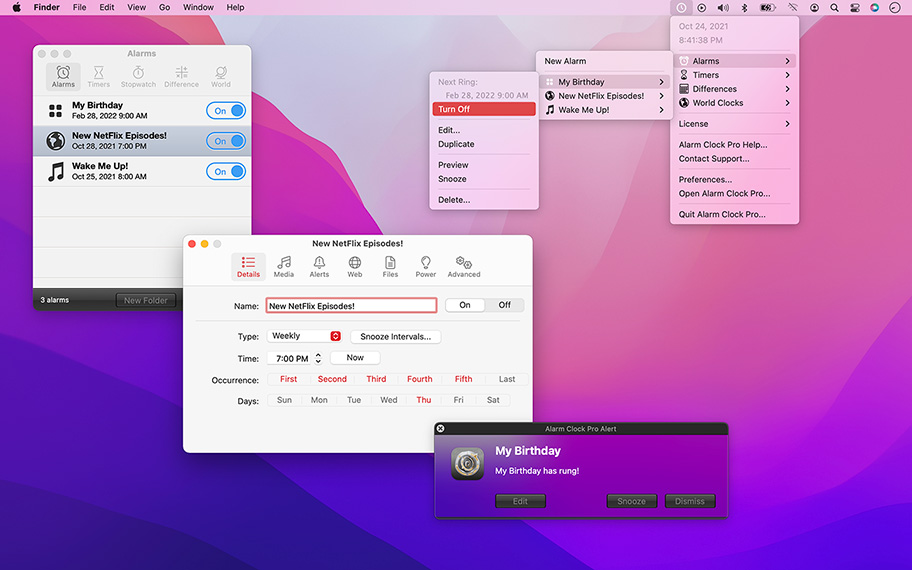
Great Taste
From the tinker-tonk of an incoming phone call, car horns during rush hour, and loud neighbours, we are all over-saturated with noise!
Wake up to the serenity of your musical selection instead! Put to rest the goofy retro beeps and buzzing of a bedside alarm clock or cell phone.


Automatically send e-mail reminders that included dynamic content such as web cam shots, screen shots, or computer information or send customized text messages!
Use Alarm Clock Pro to routinely take screenshots or web cam shots and have them e-mailed to yourself. Ideal for monitoring employees activities or helping identify the culprit if someone is using your computer without permission.
Ping web pages, launch URLs, open files, erase folders, execute shell commands, and perform a variety of other tasks!
Multi-Platform & Purpose
Fully functional Mac and Windows counterparts. Experience exactly the same product on both operating systems whether you are at work, school, home or on the go!
Use Alarm Clock Pro when waking up, as a reminder to take medications, or keep social appointments. At work, schedule follow up appointments with clients, set break reminders, run the office radio, set project timers, or discreetly monitor employee workspaces.
Other Highlights
Apple Music Enhanced
Connect directly with Apple Music to play a specific playlist or the entire library! Shuffle or play songs in sequence.
Built-in Jingles
Select from one of numerous professionally designed custom ringtones, or import an alternative!
Web Radio Ready
Stream music live from a favourite web radio station for the freshest music selection every day!
On-screen Notifications
Display passive onscreen notifications that serve as great reminders!
Stopwatches & Timers
Kitchen-style timers as well as an unlimited number of stop watches.
Wake from Sleep
Never have to leave your computer on! Automatically wakes your Mac from sleep or turns it on as needed.
Announce Text
Speak a single line, or random chunk, of text.
Apple Music Interaction
Select from any Apple Music media source and play a single song, or and entire playlist!
Audio Fader
Fade in and out of movies and music.
Differences
Calculate the difference between two time periods.
Internet Radio, Movies, and more!
Play a streaming URL, play a movie, or open a photo.
Launch Web Sites
Open a link to a web site in the default web browser.
Onscreen Notifications
Display visual alerts onscreen.
Send E-Mails
Send custom-tailored e-mail messages.
Send Text Messages
Send custom-tailored text messages.
Shell Access
Power user? Execute routine command shell operations.
Stopwatch
Easily time events or projects.
Take Screenshots
Archive or e-mail the current screen state.
Take Web Cam Photo
Archive or e-mail a snap from the web cam.
Timers
Create an unlimited number of countdown timers.
Wake Mac from Sleep
Wake the Mac from sleep on-demand for scheduled alarms. Not available on the PC version for now.
World Clocks
View clocks for various time zones relative to another.
For the full or demo version of our app, please use the download links below. After installation, the demo will automatically begin. For existing owners, unlock the app via the "Unlock..." menu item.
Current Version
All current versions of Koingo apps are compatible with the latest version of macOS or Windows (when applicable), Apple Silicon, support 64-bit architecture, and are optimized for Retina (HiDPI) Display. These retail versions of our apps are intentionally not sandboxed to provide the most flexible user experience. For sandboxed versions, see our App Store editions.

Alarm Clock Pro for PC
Version 15.9.3
Released December 22, 2025
Windows 10 (1903 from May 2019) or later
Older Versions
These versions are no longer supported and are listed primarily for customers with older licenses.
Mac Edition
- Minimum OS: macOS 10.15 (Catalina); Intel: 64-bit
Mac Edition
- Minimum OS: Mac OS X 10.4 (Tiger); PowerPC/Intel: 32 Bit
Mac Edition
- Minimum OS: Mac OS X 10.4 (Tiger); PowerPC/Intel: 32 Bit
Mac Edition
- Minimum OS: Mac OS X 10.4 (Tiger); PowerPC/Intel: 32 Bit
Mac Edition
- Minimum OS: Mac OS X 10.4 (Tiger); PowerPC/Intel: 32 Bit
Mac Edition
- Minimum OS: Mac OS X 10.4 (Tiger); PowerPC/Intel: 32 Bit
Mac Edition
- Minimum OS: Mac OS X 10.4 (Tiger); PowerPC/Intel: 32 Bit
Mac Edition
- Minimum OS: Mac OS 8/Mac OS X 10.1 (Puma); PowerPC: 32 Bit
Mac Edition
- Minimum OS: System 7.5; 68k
I use Alarm Clock Pro when I'm Reading Saadi's (great Persian poet) Boustan. just to remind me of time when I'm indulged so in the great sea of his sweet words.

Kiarash Forouharnia
This software helped me a lot in planning and does not allow me to lose valuable time
EHSAN TB
Keeps my emails and texts going out to contacts on schedule without any need for bulky and costly additional software.
Penny Jameson
So far it works pretty good, has some nice features
Ku
I like that program
Fluierari Ghenadie
Alarm Clock Pro does everything that I need a clock to do.
Robert Bass
Powerful and elegant. Sacrifices an unnecessary over-the-top interface for pure functionality. Out-of-mind and out-of-sight until you need it!
Maxi Henderson
Lets me automate a large amount of daily tasks just with alarms instead of complicated system utilities.
Nicolas Erikson
i' think it s the best clock in the internet
Donda Ghazi
Runs so many of my little daily tasks without bringing a lot of unnecessary attention to itself.
Frankie Lake
All of our products come with a full set of licensing options: from single users and households to small businesses and larger corporations.
Personal Licenses
Student/Senior
-
1 computer2 unique devices per year
Solo
-
1 computer/user5 unique devices per year
Household
-
1 household10 unique devices per year
Business Licenses
School
-
1 school300 unique devices per year
Small Business
-
10 computers/users60 unique devices per year
Corporate
-
Unlimited10000 unique devices per year
Our manual is always expanding! While we strongly believe our products as so intuitive you shouldn't need a manual, there are exceptions now and then. If you feel there is something missing from the documentation, please contact us.
For a single-page listing of all help entries, click here.
| Version 15.9.2/3 – December 22, 2025/td> | |
|
Requirements This version requires at least macOS 11 (Big Sur from Fall 2020) or Windows 10 (1903 from May 2019). We have all older versions available for download on our web site. Please use the one designed for your operating system. A current, valid, license for any Koingo app will unlock all previous versions. |
|
| Upgrade Notes This upgrade is free for users owning the current major version, an active subscription, Utility Package Pro, or a "lifetime license." No action is required other than downloading the new version from our web site and unlocking as normal with an e-mail address. For all other users, orders for the current version can be purchased on our web site. |
|
| Note: | Pending approval from Apple for com.apple.developer.usernotifications.critical-alerts alert types to break through Do Not Disturb mode. |
| Bug Fix: | Fixed corrupted binary. |