
-
 AirRadar 8Version 8.0Scanning for wireless networks is now easier and more personalized! AirRadar allows you to scan for open networks and tag them as favourites or filter them out.View Downloads Buy Now

WiFi On Demand
Finding a free WiFi network while on vacation can be a nightmare. Using advanced GPS technology, AirRadar scans and places all networks on a map. While walking or driving, AirRadar automatically updates the location of networks when it finds a better signal elsewhere.
Open networks are clearly marked with a green dot, and closed networks with a red dot. Simply throw the laptop on the passenger seat before leaving the house for the day, and after a day of driving, have a comprehensive map of open networks!


Save WiFi scan logs for future use when travelling back to a different city. Even share these logs with others.
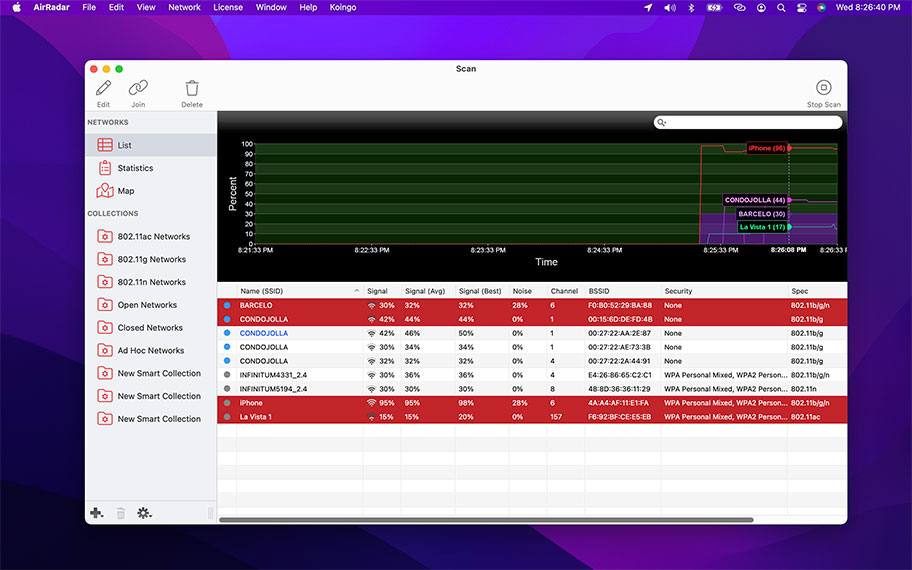
Graphing network signal strength over a period of time can help identify if other devices cause interference when they are turned on.
From viewing advanced router info to identifying unused channels, AirRadar helps System Administrators determine the best router configuration for an environment.
Enhance Home WiFi
In modern households, it's common for families to have a WiFi router. In apartment buildings and dense city areas, hundreds of WiFi signals can often be picked up from a single spot.
AirRadar can provide insight to optimizing your home network and reducing interference from other signals. The calmest, or even unused, WiFi channels are presented with every scan.
Other Highlights
Full WiFi Support
Supports all modern WiFi networks such as 802.11a/b/g/n/ac, and has expandability for future types.
GPS Integration
Identifies the best location of a network's signal and places it on a map. Locations are updated as better signals are found.
Auto-join
Automatically join the best network when it comes into range.
Alerts
Keep your eyes on the road. AirRadar can speak new network names, and play alert sounds. Also, it sports full integration with macOS' Notification Center.
Keychain Integration
Networks are optionally remembered in the system's WiFi Keychain. Whether you're using the built-in system WiFi menu or AirRadar, all of your passwords are ready when you need them.
Advanced Info
AirRadar reports much more than simply signal strength and a network name. View incredibly detailed information including encryption types, beacon intervals, vendor, channel bands, spec, and more!
Advanced Details
From Beacon Intervals to Channel Widths.
Alerts
Play audio effects or show notifications for found networks.
Auto-join
Automatically join the best network.
Enterprise Support
Compatible with Enterprise-level WPA networks.
Favorites
Easily identify networks by setting them as a favorite.
Filter
Easily filter scan results by numerous criteria.
Full WiFi Support
Supports all modern specifications like 802.11a/b/g/n/ac.
GPS Integrated
Uses macOS' internal location services to identify the approximate location of access points.
Graph
Graph network signal and noise over time.
History
Save and load network scan histories on the fly.
Keychain
Save network passwords in the system keychain for auto-filling later on.
Label
Assign label colors and notes to networks.
Multiple Cards
Choose which WiFi card to scan and join with.
Speak
Speak network names.
Statistics
Look for congested channels at a glance.
Vendor Info
Displays the vendor of each WiFi router.
For the full or demo version of our app, please use the download links below. After installation, the demo will automatically begin. For existing owners, unlock the app via the "Unlock..." menu item.
Current Version
All current versions of Koingo apps are compatible with the latest version of macOS or Windows (when applicable), Apple Silicon, support 64-bit architecture, and are optimized for Retina (HiDPI) Display. These retail versions of our apps are intentionally not sandboxed to provide the most flexible user experience. For sandboxed versions, see our App Store editions.

Older Versions
These versions are no longer supported and are listed primarily for customers with older licenses.
Mac Edition
- Minimum OS: macOS 10.14 (Mojave); Intel/ARM: 64-bit
- Maximum OS: Undetermined; works on macOS 15 (Sequoia)
Mac Edition
- Minimum OS: macOS 10.14 (Mojave); Intel/ARM: 64-bit
- Maximum OS: Undetermined; works on macOS 15 (Sequoia)
Mac Edition
- Minimum OS: macOS 10.14 (Mojave); Intel/ARM: 64-bit
- Maximum OS: Undetermined; works on macOS 15 (Sequoia)
Mac Edition
- Minimum OS: macOS 10.14 (Mojave); Intel/ARM: 64-bit
- Maximum OS: Undetermined; works on macOS 15 (Sequoia)
Mac Edition
- Minimum OS: macOS 10.14 (Mojave); Intel: 64-bit
- Maximum OS: Undetermined; works on macOS 15 (Sequoia)
Mac Edition
- Minimum OS: macOS 10.14 (Mojave); Intel: 64-bit
- Maximum OS: Undetermined; works on macOS 15 (Sequoia)
Mac Edition
- Minimum OS: Mac OS X 10.4 (Leopard); PowerPC/Intel: 32-bit
Mac Edition
- Minimum OS: Mac OS X 10.4 (Leopard); PowerPC/Intel: 32-bit
All of our products come with a full set of licensing options: from single users and households to small businesses and larger corporations.
Personal Licenses
Student/Senior
-
1 computer2 unique devices per year
Solo
-
1 computer/user5 unique devices per year
Household
-
1 household10 unique devices per year
Business Licenses
School
-
1 school300 unique devices per year
Small Business
-
10 computers/users60 unique devices per year
Corporate
-
Unlimited10000 unique devices per year
This app picks up on networks that no other app has been able to so far in my experience. You can't go wrong with this one! Very well done!

Max Porter
Best
MINI
Does what it promises and does it well.
Frans Zantvoort
This is a very fine product that helps he whenever I need to search for WiFi services. It helps me determine the type and level of security so that I can protect my communications. My only, repeat only, complaint is that its "mapping" functionality is erroneous … in my neighborhood (residential, suburban), it indicates that my next door neighbor has five (5) different networks (they have none), that I have none (I have 3), and the neighbor on the other side has none (they have one). And this is at the highest level of discrimination / magnification. Other than that, I would certainly recommend the product.
William F. Gibson
Simple to use. Works nicely for WiFi debugging.
Andrew Stevenson
Solid tool to help me tune my Wifi Setip
Saurabh Shah
Very useful for finding the best wifi if you are in a hotel or conference center. Easy to see signal strength, noise etc.
John McClanaghan
Excellent software to be on my computer. Every time I have a possibility to check how is the internet connection because any time it have different value on that change the work condition in the computer or iPhone. Really quality information I receive any moment. Thanks again.
TED G BAKARDJIEV
I really enjoy the internet, and the Air Radar software is excellent!
Robbie J Smith
AirRadar is great. Easy to use and very helpful. I like the structure and ability to categorize, it keeps things simple and clean and easily accessible. I've gone through a few similar apps and I definitely recommend this one!
Karen Seecal
Our manual is always expanding! While we strongly believe our products as so intuitive you shouldn't need a manual, there are exceptions now and then. If you feel there is something missing from the documentation, please contact us.
For a single-page listing of all help entries, click here.
| Version 8.0 – January 11, 2026 | |
|
Requirements This version requires at least macOS 11 (Big Sur from Fall 2020). We have all older versions available for download on our web site. Please use the one designed for your operating system. A current, valid, license for any Koingo app will unlock all previous versions. |
|
| Upgrade Notes This upgrade is free for users owning the current major version, an active subscription, Utility Package Pro, or a "lifetime license." No action is required other than downloading the new version from our web site and unlocking as normal with an e-mail address. For all other users, orders for the current version can be purchased on our web site. |
|
| New Feature: | By default AirRadar will always remember all networks its ever seen. We've added a clear History option. |
| New Feature: | Edit window for a network now has the full breakdown of network information presented nicely instead of just notes. |
| New Feature: | Drag splitter in the main window. |
| New Feature: | If scan interval is 2 min or less, we now show time in "time ago" format. |
| New Feature: | 3 graph modes: noise, signal or noise and signal. |
| Modification: | Filter renamed to Ignore. |
| Modification: | Running our helper tool via an internal shell now instead of NSTask to alleviate some lock ups. |
| Modification: | Many strange wordings removed in favor of more common ones. For instance, we are now calling networks Unavailable instead of Dead. |
| Bug Fix: | Noise column now only correctly shows for the currently connected network. |
| Bug Fix: | Now respects if there's no network name. |
| Bug Fix: | Fixed a weird square appearing in the graph before AM/PM (wrong font issue). |
| Bug Fix: | Fix the main list columns have never been resized yet, they will auto-size after the first scan completes. |
| Bug Fix: | Scan on startup now works even if the user hasn't granted permission yet. Scan will start as soon as we have permission. |
| Bug Fix: | Fixed sort order when sorting by signal or nose strength. |